Navigation Info
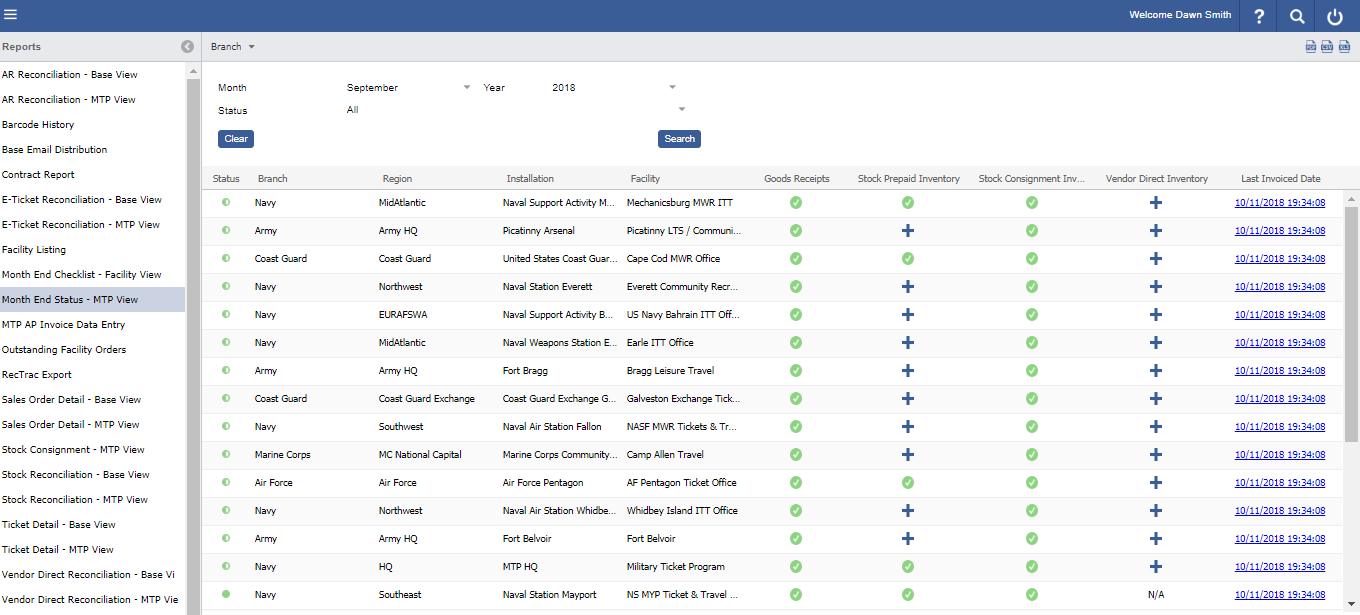
Reports> Month End Checklist- MTP View
A checklist of month end closing requirements, per Facility. Displays the closing requirements progress & completion for the selected month and year.
Each Checklist Item requires specific actions in order to complete. | |
|---|---|
| Item | Task/s to Complete |
| Goods Receipts | All Goods Receipts must be "Marked Complete", no outstanding receivings/ shipments. |
| Stock Prepaid Inventory | Enter month end inventory counts, by Price Code, for all stock prepaid tickets |
| Stock Prepaid Report | A user must execute the report. |
| Stock Consignment Inventory | Enter month end inventory counts, by Price Code, for all stock consignment tickets |
| Stock Consignment Report | A user must execute the report. |
| Vendor Direct Inventory | Each Vendor record must be Verified. |
Logic
All Checklist Items:
If there are no items required to be verified a ‘green check’ will automatically apply, in place of the ‘+’ sign.
Stock Inventory Counts:
- "Done" will leave Checklist Item in progress. "Submit" will lock the record counts.
Stock Inventory Reports:
- Once executed for the month, the report header will retain the original Run Date and executing User ID.
Vendor Direct:
- Vendor Direct Sales will only display once MTP has uploaded the sales by vendor. (Between the 5-10th of the month)
- For installations that have multiple facilities, sales and returns will apply to the primary facility.
- Only primary facilities will see the buttons for Vendor Direct and the other facilities will see "N/A".
- Non-primary facilities' status will turn green if they have completed all other check list items, even if the primary facility in their installation has not completed the Vendor Direct Sales item.
- Only primary facilities will see the buttons for Vendor Direct and the other facilities will see "N/A".
- Clicking a Vendor line item in the list will open an additional window to display the files uploaded and allow verification.
- "Done" will leave Checklist Item in progress. "Verify" will lock the record counts.
- Each Vendor list will have a "Verify" button
Note
- Users will have the ability to download and print a count sheet to complete ending inventory counts, for Stock Tickets.
- Users have the ability to save progress on their checklist and submit when completed, see the above logic.