The site page layout will determine if pages may incorporate components. If allowed, content contributors can choose how to display and organize components, along with configuring component elements.
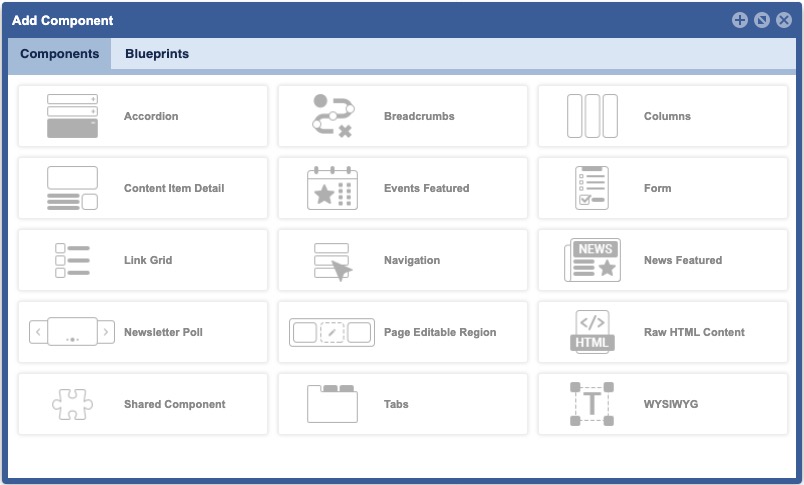
TO ACCESS Site Planner:
launch the application
from global navigation
select Site Planner
- select a Site Page
- Click Component- Add/Configure icons
Accordion
The accordion component delivers large amounts of content in a small space through progressive disclosure. Lowering the chances that users will feel overwhelmed by the abundance of data.The header title acts as a high level overview, while the hidden content provides more detail.
When to Use:
- Organize related information, such as with FAQs.
- Shorten pages and reduce scrolling when content is not crucial to read in full.
Breadcrumbs
Breadcrumbs display a list of items, which are aligned side by side, orienting the users to a current location. Allowing quick navigation of the hierarchal structure of content of two or more levels.
When to Use:
- Intended as a secondary form of navigation, never a primary.
- Enabling user to quickly move up to a parent level or previous step.
Columns
Displays inline content in multiple columns.
When to Use:
- Creates containers for grouped content without having to split into multiple containers.
Content Item Detail
Allows a user to insert a content item detail for a selected content type and blueprint. If a content item is not chosen, the ID in the page URL will be used to find it.
When to Use:
- Use it when you want to show the detail of a content item somewhere in a page other than the default detail page.
Events Featured
Users can create an event list from Activities that have the flag "Featured" ON. This list can also be restricted to a set display count.
When to Use:
- When promoting featured events.
Forms
Insert an existing Form into a Page.
When to Use:
- When a form is needed to capture related data.
Link Grid
Displays a link list using the blueprint specified for each link.
When to Use:
- Use this to display links in a grid layout.
Navigation
Create a navigation bar that can be used for your main site navigation.
When to Use:
- Use where pagination needs to be shown.
Featured News
Displays News that has been marked as "Featured".
When to Use:
- Use where highlighted News Articles should display.
Newsletter Poll
When to Use:
Page Editable Region
Editable regions within a site page control which areas of a template-based page a user can edit. Content editors can choose which components to add within editable areas, and thus adjust the structure of the page.
When to Use:
RAW HTML Content
Insertion of custom HTML content.
When to Use:
Shared Component
When to Use:
Tabs
Tabs organize related content into defined navigational buckets. Each clickable tab contains higher-level content labels and displays lower-level content with each clickable interaction.
When to Use:
- Organize related information, such as with FAQs.
- Shorten pages and reduce scrolling when content is not crucial to read in full.
WYSIWIG
WYSIWYG (What You See Is What You Get) is a rich text editor designed to simplify website content creation.
When to Use:
Use to insert of custom text and elements/objects.