The site page layout will determine if pages may incorporate blueprints. If allowed, content contributors can choose how to display and organize blueprints, along with configuring their elements.
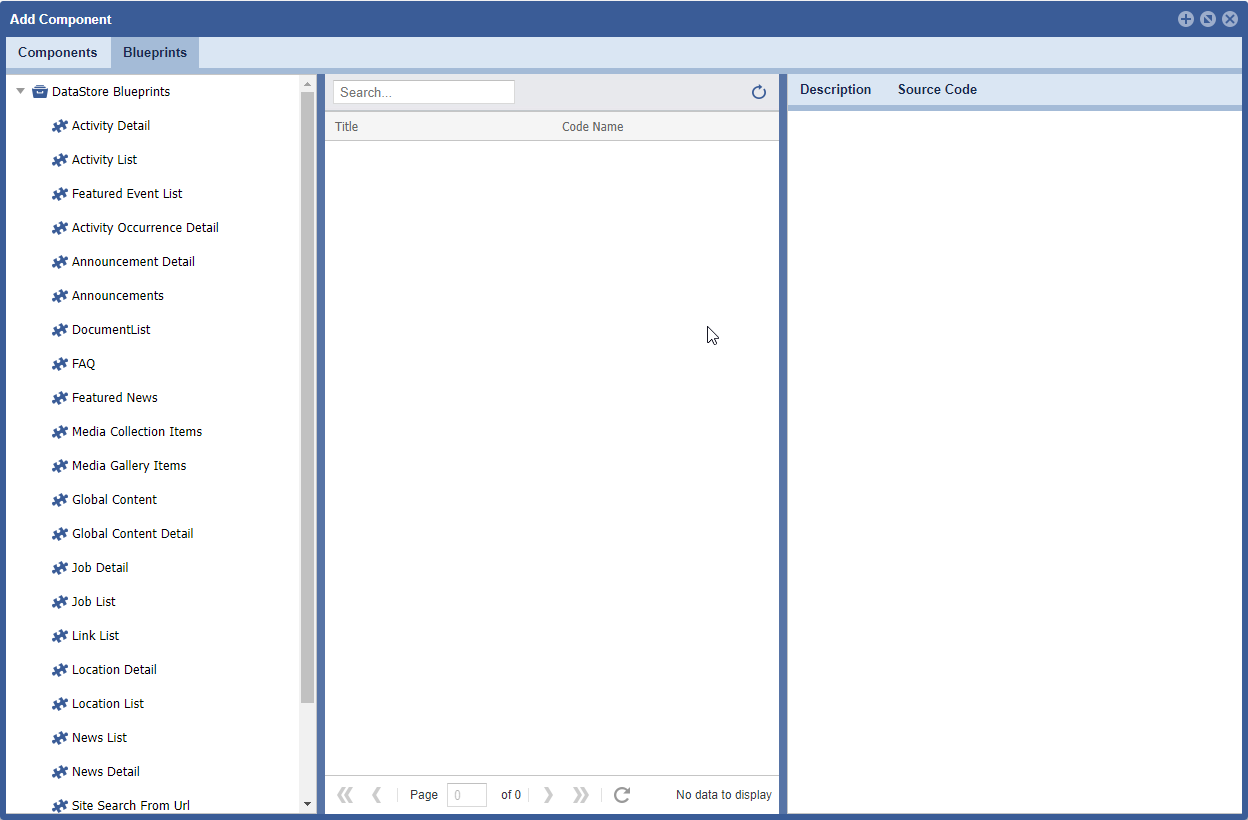
TO ACCESS Site Planner:
launch the application
from global navigation
select Site Planner
- select a Site Page
- Click Add/Configure icons
Activity Detail
Displays Activity details, this is not a summary or list view. This will display detailed information about an Activity.
Formats:
| Blueprint | Description | When to use |
|---|---|---|
| activitydetail.activitydetail | Displays all Activity Details within a page. |
Activity List
Formats:
| Blueprints | Description | When to use |
|---|---|---|
| activity.event_list | Displays all events associated to the Groups and Activity Categories and Sub-Categories selected. | |
| activity.featured_events | Filters event lists to ONLY display "Featured" events. |
Featured Event List
Formats:
| Blueprints | Description | When to use |
|---|---|---|
| None at this time |
Activity Occurrence Detail
Formats:
Blueprints | Description | When to use |
|---|---|---|
None at this time |
Announcement Detail
Formats:
| Blueprints | Description | When to use |
|---|---|---|
| None at this time |
Announcements
Formats:
| Blueprints | Description | When to use |
|---|---|---|
| announcement.alert | Designed to pop up an announcement, on the page, if any exist for the Group, Tags and Category settings within this blueprint configuration. Once clicked the alert will hide for 10 hours, assuming a browser cache has not been cleared. |
Document List
Formats:
| Blueprints | Description | When to use |
|---|---|---|
| None at this time |
FAQ
Formats:
| Blueprints | Description | When to use |
|---|---|---|
| faq.accordion | Displays an accordion with questions as title and answers within the accordion body. Used when a condensed list is need within a page. |
Featured News
Formats:
| Blueprints | Description | When to use |
|---|---|---|
| None at this time |
Media Collection
Formats:
| Blueprints | Description | When to use |
|---|---|---|
| gallerymediaitem.resources | Displays a list of resources within a media manager Collection folder. Typically used to display folders and files within a collection folder. Display a list view of the media and details, an image icon, file name and image size display. | |
| gallerymediaitem.simple_list | Displays a list of resources within a media manager Collection folder. Typically used to display folders and files within a collection folder. Display in a list view, using the file name as the line item title, within the list. |
Media Gallery
Formats:
| Blueprints | Description | When to use |
|---|---|---|
| gallerymediaitem.carousel | Presents a collection of images, shows several images at once. They’re ideal for showing group of images or to use as a “Featured Product” slider for a homepage. | |
| gallerymediaitem.gallery | Displays image media as a gallery, it can include captions, links, title texts and alt text. | |
| gallerymediaitem.slider_-_four_up | Displays four centered images at a time. If more than 4 are present in the selected Gallery it will rotate the images. A count can be set to limit the number of images cycling through the display. For example, if 5 is chosen the | |
| gallerymediaitem.small_carousel | Presents a collection of images, shows several images at once. Ideal for showing a group of images within the page body. |
Global Content
Formats:
| Blueprints | Description | When to use |
|---|---|---|
| None at this time |
Global Content Detail
Formats:
| Blueprints | Description | When to use |
|---|---|---|
| None at this time |
Job Detail
Formats:
| Blueprints | Description | When to use |
|---|---|---|
| job.job_detail | Display a Job's details. Content editors can set this to a specific job or if left blank the Id will be obtained form the URL. |
Job List and Search
Formats:
| Blueprints | Description | When to use |
|---|---|---|
| job.job_list_and_search | Presents jobs in a list view, filtered by the configuration Group settings. The job listing view is accompanied by a search feature. |
Link List
Formats:
| Blueprints | Description | When to use |
|---|---|---|
| linklistlink.four_wide | Associated links will display within 4 columns. Presented with a picture, title, teaser text and a "More" button. |
Location Detail
Formats:
| Blueprints | Description | When to use |
|---|---|---|
| programdetail.location_detail | Display a Location's details. Content editors can set this to a specific location or if left blank the Id will be obtained from the URL. | |
| ProgramDetail.location_hero_banner |
Location List
Formats:
| Blueprints | Description | When to use |
|---|---|---|
| Program.accordion_ | Displays Location details in an accordion style. | |
| Program.description_list | Displays Location details in a list, accompanied by a description. | |
| Program.facility_list | Displays list of all facilities titles. Configuration can filter this data by setting specific Categories or Groups. | |
| program.landing_page | Displays a list of all facilities titles, accompanied by a description. This is typically used on pages that show all the facilities for a given program. For example, if filtered by CYP, all related CYP facilities will display within the list. | |
| program.tab_layout | ||
| Program.tabs_horizontal | ||
| Program.tabs_vertical |
News List
Formats:
| Blueprints | Description | When to use |
|---|---|---|
| news.news_list | Presents news articles in a list view, filtered by the configuration of Group settings. | |
| news.ticker | Presents news teasers within a page. |
News Detail
Formats:
| Blueprints | Description | When to use |
|---|---|---|
| news.news_detail | Display a News detail. Content editors can set this to a specific location or if left blank the Id will be obtained from the URL. |
Search Results
Formats:
| Blueprints | Description | When to use |
|---|---|---|
| searchresultset.search_results |
Site Pages
Formats:
| Blueprints | Description | When to use |
|---|---|---|
| None at this time |
Site Planner
Formats:
| Blueprints | Description | When to use |
|---|---|---|
| navitem.main_navigation | Add Navigation to a page. |
Custom Blueprints
Formats:
| Blueprints | Description | When to use |
|---|---|---|
| jsondata.activity | None | |
| jsondata.anchor_sub-navigation | ||
| jsondata.blocktitle | ||
| jsondata.enterprise_ad | ||
| jsondata.facebook_page_plugin | Uses Facebook's plugin to embed Facebook content into a webpage. | |
| jsondata.fadecarousel | ||
| jsondata.footer_logos | ||
| jsondata.google_analytics | ||
| jsondata.kings_bay_contstant_contactjsondata.iframe | ||
| jsondata.logo_switcher | ||
jsondata.media_video_embedjsondata.mayport_constant_contact_popup | ||
| jsondata.mwr_menu | ||
| jsondata.n9_ad | ||
| jsondata.newsletter_signup | Inserts a newsletter form into a page. This will capture contact information and add to a subscriber list. | |
| jsondata.pager_default | ||
| jsondata.parallax | Add a parallax effect to an element, specifically an image. | |
| jsondata.program_spotlight | ||
| jsondata.regionalcarousel | ||
| jsondata.slickcarousel | ||
| jsondata.social_iframe | Embeds social media into a page. | |
| jsondata.social_media_-_blue | ||
| jsondata.social_media_-_white | ||
| jsondata.youtube_video_embed | Allows the embedding of a youtube video. | |
| jsondata.social_iframe | Inserts an iframe into the page. |