Skip to main content
assistive.skiplink.to.breadcrumbs
assistive.skiplink.to.header.menu
assistive.skiplink.to.action.menu
assistive.skiplink.to.quick.search
Log in
Help / Tips
Help
Online Help
Keyboard Shortcuts
Feed Builder
What’s new
About Confluence
Search
Site Home
Quick Search
Hit enter to search
Navy General Library Program
Content
Pages
Blog
Space Tools
Settings
Content Tools
View Page
A
t
tachments (7)
Page History
Page Information
View in Hierarchy
View Source
Export to PDF
Export to Word
Breadcrumbs
Pages
…
Getting Started
Site Planner
Managing Web Pages
Deleting a Page
Page History
Versions Compared
Old Version
1
changes.mady.by.user
Kimberly Hansard
Saved on
Jul 29, 2016
compared with
New Version
Current
changes.mady.by.user
Kimberly Hansard
Saved on
Aug 01, 2016
View Page History
Key
This line was added.
This line was removed.
Formatting was changed.
Step-by-step guide
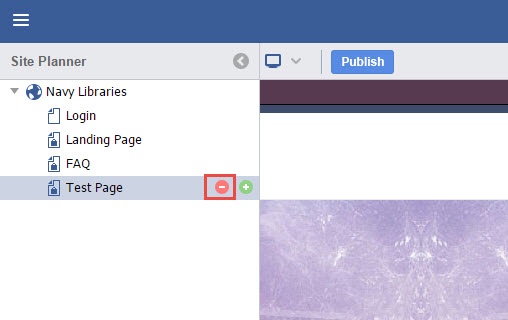
In the Site Planner, hover the mouse over the page to be deleted and click the red "-" button.
Image Removed
Image Added
Confirm the page deletion by clicking Yes.
Image Removed
Image Added
The page is now deleted.
Image Removed
Image Added
...
null