• Skip to main content
  • assistive.skiplink.to.breadcrumbs
  • assistive.skiplink.to.header.menu
  • assistive.skiplink.to.action.menu
  • assistive.skiplink.to.quick.search
  • Log in
  • Help / Tips Help
    • Online Help
    • Keyboard Shortcuts
    • Feed Builder
    • What’s new
    • About Confluence
  • Search
Global Site
  • Site Home
Hit enter to search
Navy Motion Picture Services Theater Manager

    Content

  • Pages
  • Blog

    Space Tools

  • Settings
  • Content Tools

  • Add a Digital Cinema Booking Notice
  • Add Custom Item
  • Delete a Custom Item
  • Delete a Digital Cinema Booking Notice
    • Attachments (3)
    • Page History
    • Page Information
    • Resolved comments
    • View in Hierarchy
    • View Source
    • Export to PDF
    • Export to Word
Skip to end of banner
  • Jira links
Go to start of banner

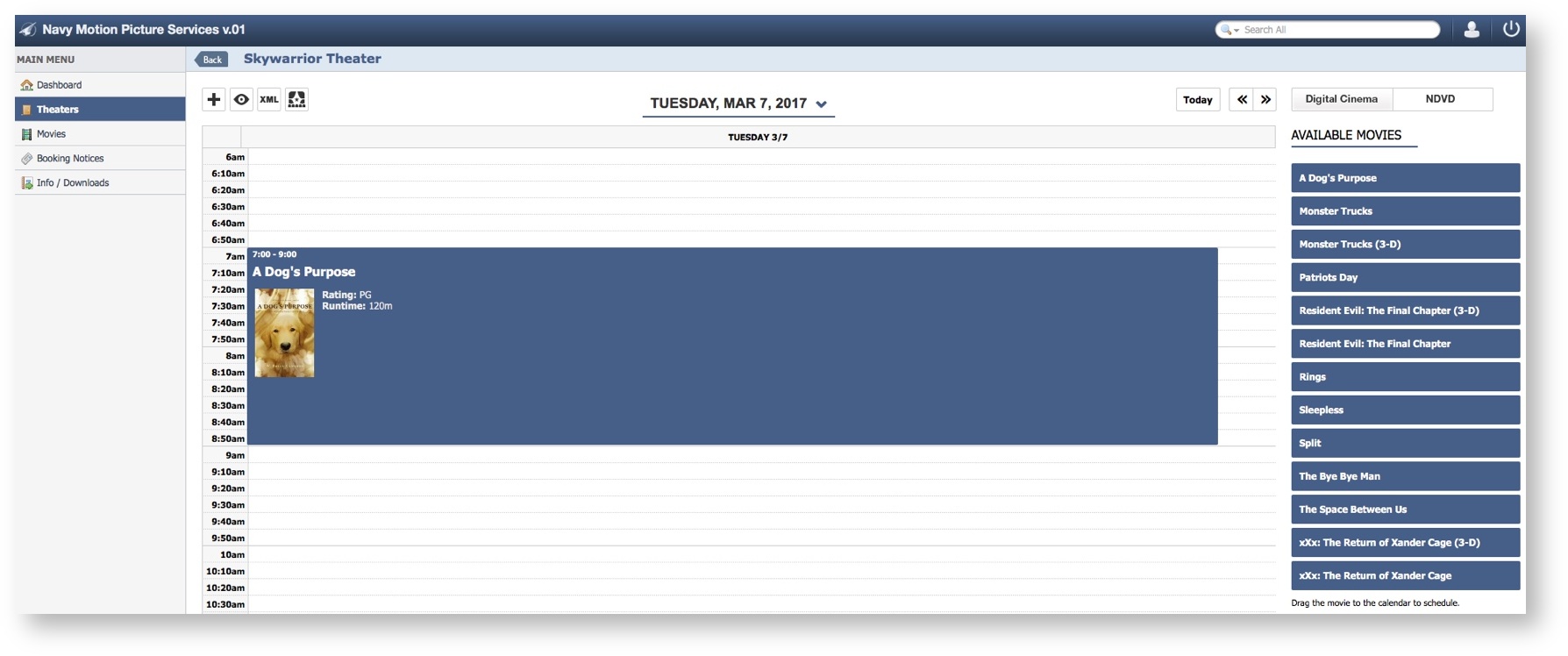
Create a Theater Schedule

  • Created by Kimberly Hansard, last updated on Mar 17, 2017 1 minute read

Step-by-step guide

  1. Select Theaters
  2. Select a Theater

To perform additional actions choose a link:

Add a Custom Event

Add a Digital Cinema Booking Notice

Navigate to a new Day

Delete a Custom Item

Delete a Digital Cinema Booking Notice


For technical assistance contact
1-844-697-4357

null