Page History
| Info | ||
|---|---|---|
| ||
Order Fulfillment> Add or Edit Order |
- Select the appropriate Order Fulfillment filter from the left navigation.

Select the appropriate Type Filter from the Dropdown Menu.
Select an item from the Branch Filter.
Next, select an item from the Region Dropdown.
- Double click on an order to view the dataOrder Details.

The order details display.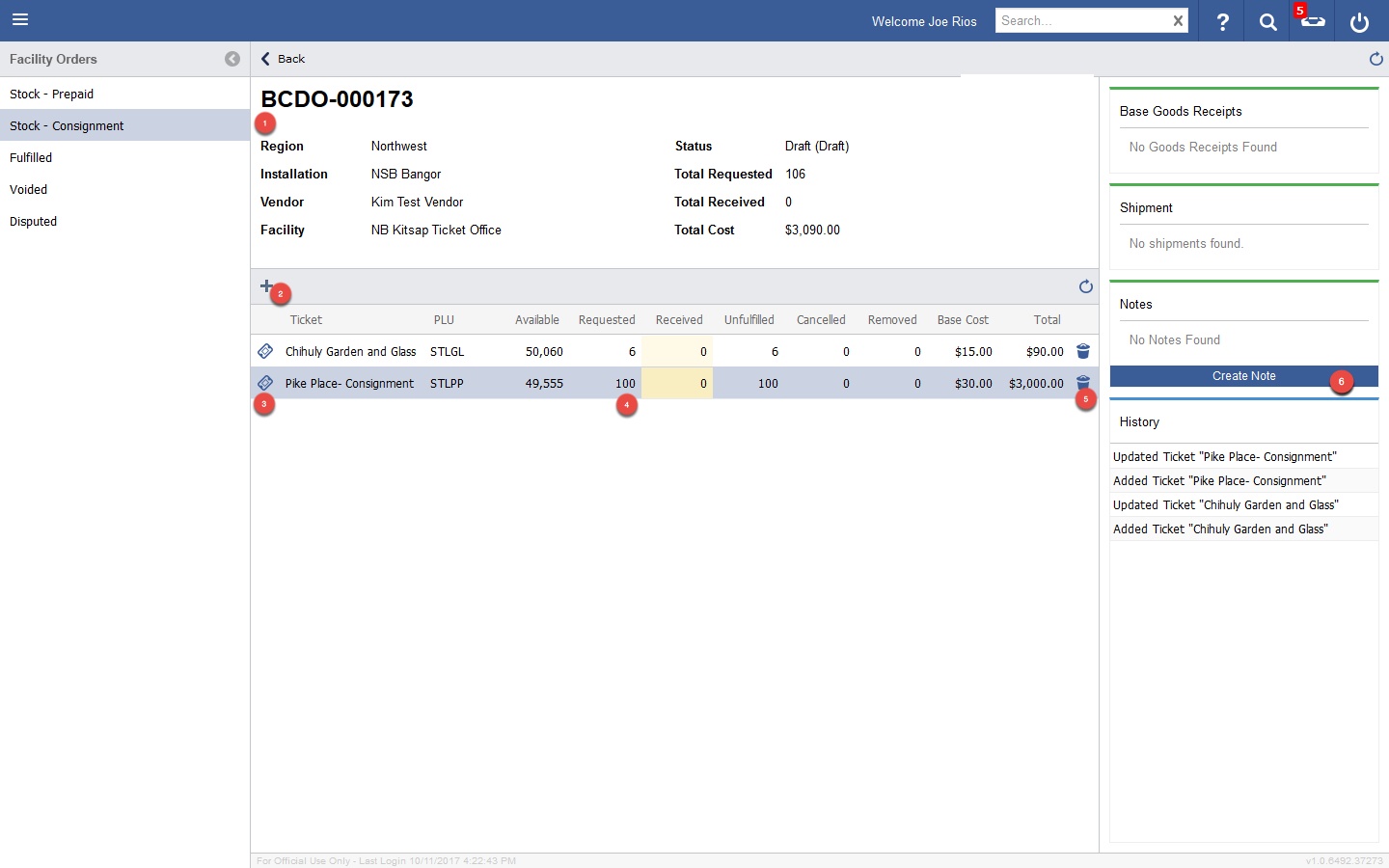
Order Detail- Split Screen
| Circle | Element | Description | |
|---|---|---|---|
| 1 | Order Details | Displays Detail about the Order | |
| 2 | Add Tickets | Add Tickets to the Order | |
| 3 | Ticket Details | Opens a Popup Window with Ticket Details. | |
| 4 | Requested Amount | Enter the amount Requested for the Ticket Line Item. | |
| 5 | Delete | Delete a Ticket Line Item. | |
| 6 | Create Note | Receiving, Disputes and History Tabs | Access the more details related to the order via the detail tabsCreate a Note for historical purposes. |